Friday, April 26, 2019

AZ-102 exam

I've just passed exam AZ-102, Microsoft Azure Administrator Certification Transition, which I wanted to do it for some time, considering that will be retired on June 30th.

It covers a lot of Azure administration, especially VNets, AAD, monitoring and migrations. It was interesting to read about newly introduced features, since my previous 70-533, which you need to have in order to take this transition exam instead of full AZ-100 / AZ-101. For instance, I wasn't sure if they will use new Azure PowerShell with 'Az' prefix or regular 'AzureRm' - it was the later.

Now I'm ready for the next ones in the pipeline :)


Monday, April 15, 2019

NGINX with custom HTTPS local test domain on Mac OS

This is more a note  to myself, because I'm always forgetting the easiest way to generate a self signed trusted SSL wild-card certificate for local test domain, like sample.test. You can use OpenSSL tool to generate it like this:

openssl req -x509 -newkey rsa:2048 -sha256 -days 3650 -nodes -keyout sample.test.key -out sample.test.crt -subj /CN=*.sample.test

You can also add it to your Mac OS Keychain Access with this:

sudo security add-trusted-cert -d -r trustRoot -k /Library/Keychains/System.keychain sample.test.crt

But in my case was still not trusted, so it didn't work fine in Google Chrome.

The easiest way is to use open-source mkcert. You can install it with brew on Mac OS or download the latest release version for your OS. Just follow the docs to install it and generate a new certificate, which will be also automatically properly registered:

mkcert sample.test "*.sample.test" localhost 127.0.0.1

After renaming the files as sample.test.key and sample.test.crt, copying them in NGINX folder change nginx.conf file (or an included file) to something like this:

upstream sample-test {
        server localhost:5001;
        server localhost:5002;
    }

server {
    listen *:80;
    server_name     www.sample.test sample.test;
    add_header Strict-Transport-Security max-age=15768000;
    return 301 https://$host$request_uri;
}

server {
    listen *:443    ssl;
    server_name     www.sample.test sample.test;
    ssl_certificate sample.test.crt;
    ssl_certificate_key sample.test.key;
    ssl_protocols TLSv1.1 TLSv1.2;
    ssl_prefer_server_ciphers on;
    ssl_ciphers "EECDH+AESGCM:EDH+AESGCM:AES256+EECDH:AES256+EDH";
    ssl_ecdh_curve secp384r1;
    ssl_session_cache shared:SSL:10m;
    ssl_session_tickets off;

    add_header Strict-Transport-Security "max-age=63072000; includeSubdomains; preload";
    add_header X-Frame-Options DENY;
    add_header X-Content-Type-Options nosniff;

    access_log  /usr/local/etc/nginx/logs/access.log;
    location / {
        proxy_pass  http://sample-test;
    }
}

This uses NGINX SSL termination, so traffic from NGIX to application server is not encrypted, and uses NGINX upstream to load balance HTTP traffic to multiple (2) web application instances. All traffic on port 80 (HTTP) is automatically redirected to port 443 (HTTPS), which uses newly generated certificates.


Tuesday, April 9, 2019

Google Cloud Run

An interesting announcement today from Google: Cloud Run. See their details and pricing, interestingly enough, rounded up to the nearest 100 millisecond.

My first impression is that Google is offering something similar to Azure Container Instances, which has the same idea of deploying workloads in a serverless way using containers, paid by the second (Azure) or hundredth millisecond (GCP).

One good thing about GCP offer is the free quota of Cloud Run, which has 2 million free requests, excellent for trying them out. On the down side they don't support .NET Core, only other languages, like Node.js, Python or Golang.

Read the full announcement for all details and features, like the full stack of serverless apps.

This is something  I'd definitely want to try.

Tuesday, April 2, 2019

Visual Studio 2019

If you are following Microsoft's news you know that they launched today Visual Studio 2019. I installed it some weeks ago and worked fine on Windows, except the hiccup I had on Mac with Preview 3. Download it from here.

Watching some videos and reading some articles on VS 2019 I found out some interesting stuff I wasn't aware before:

  • Live Share works for VS 2017 and Visual Studio Code, just install the appropriate plugins. Super handful.
  • Find out about solution filters: load only the projects you need immediately, with easy loading dependencies with a click of a button (notice "unloaded" projects):
  • Even better, you can save that list as a *.slnf file, and reopen easily next time.
  • CodeLens for Community version.
  • ML enhanced search. Very easy to add a class or interface from the search textbox (CTRL-Q). 
  • IntelliCode: analyze your code (ML) for improved IntelliSense suggestions (notice the start in front of frequently used properties or methods):


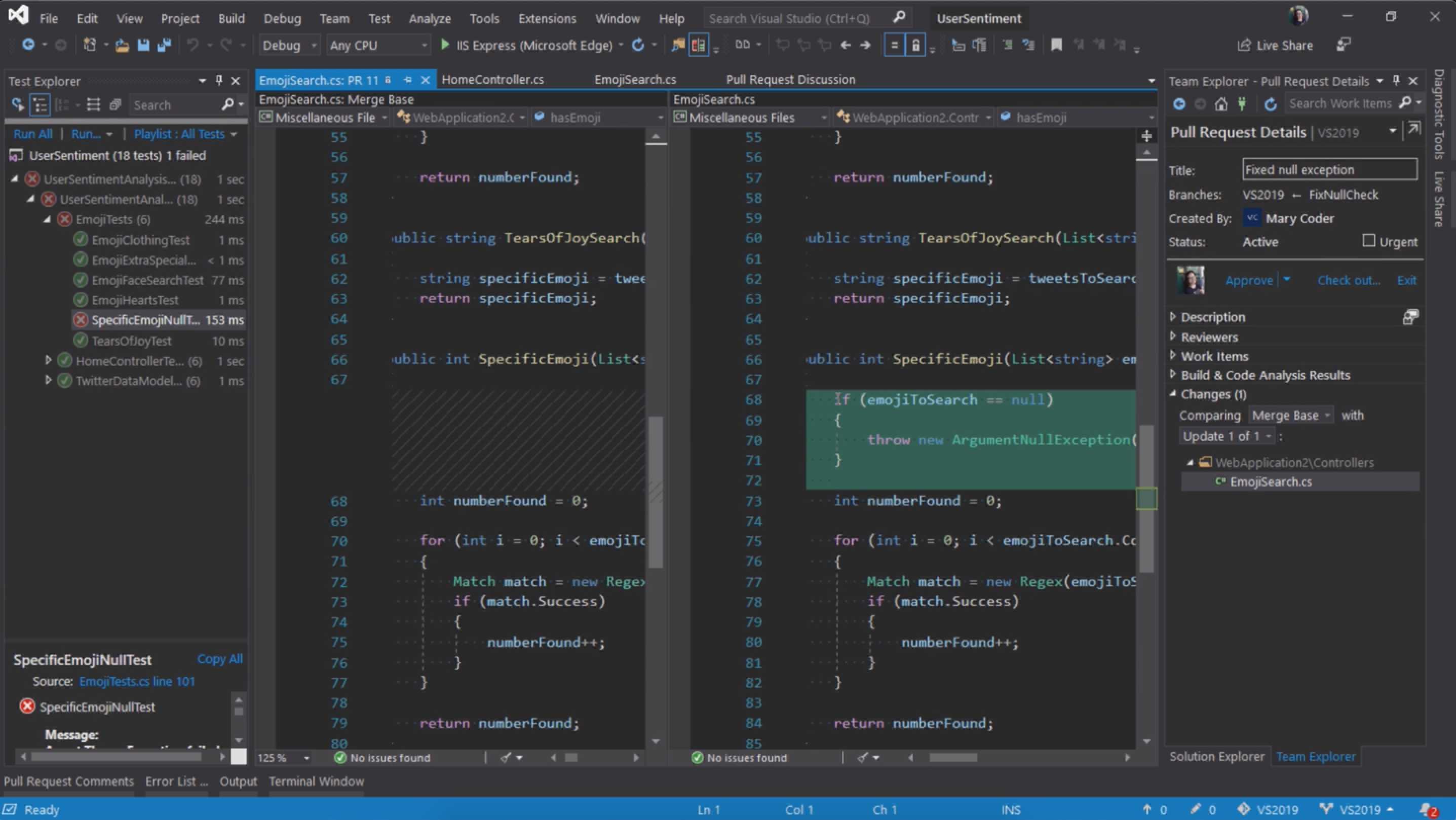
  • Integrated code reviews (pull requests):


See the whole list of new features.


Sunday, March 31, 2019

.NET Core decorator pattern with Lamar

Two days ago I read some news about Lamar 3.0, new version of Lamar dependency injection library meant to replace the well established but closing down StructureMap. Because yesterday I tested decorators with Scrutor, I wanted to try something similar with Lamar, a chance to use it for the first time.

Docs are very minimal, and took me a while to understand that I must add Shouldly, which I didn't use before either. Of course I didn't read the entire documentation before trying Lamar, so their example didn't work for me. Eventually I get back to StructureMap decorators and use it similarly like this:


This way it seems to work fine, but still some work on the documentation should be done, I think. But I promise I'll try a bit more their GitHub test samples, which hopefully will clarify many aspects.

One thing I read about it and liked, was that it plays nicely with default .NET Core dependency injection implementing IServiceCollection.


.NET Core decorator pattern with DI and Scrutor


I few days ago I tested .NET Fiddle with some .NET code, but since then I found out its biggest limitation: doesn't work with .NET Core. Only later I noticed the .NET Framework version is 4.5, but most importantly it can't be changed.

So, my next test for decorator pattern failed, as I wanted to use Scrutor library with default .NET Core Dependency Injection.

Consequently, here's the Gist from GitHub
As you can see, using this small library, is very easy to add new functionality to existing objects (using Decorate() extension DI method), expanding them, especially when we don't have access to source code to change those objects directly. Besides Decorator it also can scan assemblies (which in fact is the main functionality of the library), working with default .NET Core dependency injection.

In this case I simulated some sort of logging (on console) after interface methods call, but can be used for many other objectives, like adding caching, authorization (before calls), notifications, and so on.

Saturday, March 30, 2019

ASP.NET Core Identity with MediatR

A good way to play with ASP.NET Core 3.0 Identity (using VS 2019 preview) and MediatR is this sample project on GitHub.

MediatR is a small but very useful utility library which main goal is to implement Mediator pattern, but is more than that. For instance comes with ASP.NET Core Dependency Injection extensions, pipelines (or behaviors) that implement decorator pattern, and few other goodies. Simply speaking, it may be a very first step toward CQRS, to split up queries and commands. In many cases is used more like a command pattern, I think.

In my case I wanted to use MediatR to extract from identity Razor pages all references to Microsoft.AspNetCore.Identity and move the code in some handlers. This should help unit testing because page's OnGetAsync() or OnPostAsync() are only calling mediator Send() method which does the job, without any reference to Identity's SigInManager class.

To start with, just create a new ASP.NET Core web application with local identity accounts, so the entire back-end to identities are already created. Then I run the database migration:

dotnet ef database update

If you ran the application at this stage it should work, so you should be able to register a new account and login. By default, ASP.NET uses default identity UI which hides from us all details. If we want to customize the login, for instance, as we do, we need to scaffold the pages and manually change them in the project, see this docs link:

dotnet tool install -g dotnet-aspnet-codegenerator
dotnet add package Microsoft.VisualStudio.Web.CodeGeneration.Design
dotnet restore

To actually generate the pages use this:

 dotnet aspnet-codegenerator identity -dc SampleMediatR.Data.ApplicationDbContext --files "Account.Register;Account.Login;Account.Logout"

Newly generated login, logout and registration pages are available under /Areas/Identity/Pages/Account:


At this stage, if you want to run the application is important to comment out in Startup.cs in ConfigureServices() the call of AddDefaultUI() because we don't need it anymore (once scaffolded in the app):

services.AddDefaultIdentity<IdentityUser>()
        //.AddDefaultUI(UIFramework.Bootstrap4)
       .AddEntityFrameworkStores<ApplicationDbContext>();

Actually, scaffolding operation created a new file in the root of the project called ScaffoldingReadme.txt with instruction on how to set it up.

Also, I created a new folder called 'MediatR' under /Areas/Identity for classes needed by MediatR library, but first let's add those references:

dotnet add package MediatR
dotnet add package MediatR.Extensions.Microsoft.DependencyInjection

Then add it for dependency injection in Startup.cs ConfigureServices():

services.AddMediatR();

Now we are ready to implement query & handler classes needed by MediatR. For instance MediatR/LoginGet.cs has 2 classes: query (request) called "LoginGet" and handler called "LoginGetHandler". First one wraps the data passed to the handler, while the second is the handler doing the job in method called Handler(), called automatically by the MediatR library.

public class LoginGet: IRequest<IEnumerable<AuthenticationScheme>> { }

public class LoginGetHandler : IRequestHandler<LoginGet, IEnumerable<AuthenticationScheme>>
{
    private readonly SignInManager<IdentityUser> _signInManager;
    private readonly IHttpContextAccessor _httpContextAccessor;

    public LoginGetHandler(SignInManager<IdentityUser> signInManager, IHttpContextAccessor httpContextAccessor)
    {
        _signInManager = signInManager;
        _httpContextAccessor = httpContextAccessor;
    }

    public async Task<IEnumerable<AuthenticationScheme>> Handle(LoginGet request, CancellationToken cancellationToken)
    {
        await _httpContextAccessor.HttpContext.SignOutAsync(IdentityConstants.ExternalScheme);
        return await _signInManager.GetExternalAuthenticationSchemesAsync();
    }
}

Notice couple things:
  • LoginGet class implements MediatR's IRequest interface with type IEnumerable<AuthenticationScheme>, which is exactly the type returned by Handle() method. In this case the class doesn't need any properties (but see some in LoginPost.cs).
  • In LoginGetHandler() constructor is injected from DI both SignInManager and HttpContextAccessor (which was added in Startup.cs with services.AddHttpContextAccessor(), just to get access to HttpContext in a safe way). 
  • Handle() function uses SignInManager and HttpContextAccessor to call necessary functions.
Then OnGetAsync() in page Login.cshtml.cs uses it this way:

ExternalLogins = (await _mediator.Send(new LoginGet())).ToList();

All the previous logic that didn't belong to the OnGetAsync() controller was moved to the MediatR handler, and similarly for OnPostAsync(), as well as Logout.cshtml.cs OnPostAsync().

See the code for other details.